Some people eat, sleep and chew gum, I do genealogy and write...

Tuesday, November 4, 2014

FamilySearch and MyHeritage announce Library Edition of MyHeritage.com

Quoted from the Press Release entitled, "FamilySearch Introduces MyHeritage's Institutional Service at Family History Centers and Libraries:"
SALT LAKE CITY, Nov. 4, 2014 (GLOBE NEWSWIRE) -- FamilySearch and MyHeritage announced today that the MyHeritage Library Edition™ is now available for free at every FamilySearch Family History Center and Family History Library in the world. MyHeritage's new institutional service is a powerful online service that provides libraries and educational facilities with instant access to centuries of history in billions of global historical documents.
There was more information about the MyHeritage.com Library Edition:
The MyHeritage Library Edition™, launched last month and distributed exclusively by EBSCO Information Systems, provides access to billions of historical documents, millions of historical photos and other resources in thousands of databases that span the past 5 centuries. Available in 40 languages, the MyHeritage Library Edition™ is the industry's most multilingual family history archive and search engine, breaking down geographical and language barriers in research.
The Library Edition contains:
  • More than 5 billion historical ​records from all over the world
  • The USA federal census (1790-1940) and the UK census (1841-1911) with images​
  • 1.5 billion exclusive family tree profiles from MyHeritage and Geni
  • 816 million US public records
  • Hundreds of millions of Nordic records
  • More than a hundred million tombstone photos
  • More than 80 million historical photographs
  • Military records, immigration records and passenger lists
  • Citizenship & naturalization records
  • Directories, guides, references, biographies and yearbooks
  • Government, land and court records
  • Wills and probate records
  • Exclusive databases such as the Jewish Chronicle historical newspaper
  • Additional content under license including Tributes obituaries, WikiTree, Billion Graves, Canadian Headstones and many others
  • 200 million additional records added on average every month!
From watching the counter on MyHeritage.com, it looks like to me that they are also signing on about 100,000 new members every month. This is good news for everyone interested in genealogical research. 

Old English Abbreviations and Odd Terms

I recently received the following question:
Where can I find a glossary of odd terms and abbreviations in English sources? Some that were hard for me to decipher: AT, HMD, IPO? Thanks.
It is not unusual for a reference book, especially those written from an academic standpoint, to have its own list of abbreviations or acronyms for standard sources. These usually appear at the beginning of the book. Unfortunately, these acronyms, especially short ones such as those given in the question, can have multiple meanings depending on the context. The online website, the Acronym Finder, lists 32 separate definitions for the acronym "HMD." This website also has an additional 83 definitions in the "Acronym Attic."

As I looked through this long list of meanings for "HMD" I saw several that could apply to the genealogical context. But that does not rule out the possibility that the acronym was a "one time" use for that particular reference book and does not appear in the list at all.

One book I like to use is the following:

Evans, Barbara Jean. A to Zax: A Comprehensive Dictionary for Genealogists & Historians. Alexandria, VA: Hearthside Press, 1995.

I find this book extremely useful to define truly old English and very archaic terms. Unfortunately, the acronym "HMD" does not appear in the book. But the acronym "H.M." applies to "his or her Majesty." Both "AT" and "IPO" have too many possible translations as to be virtually impossible to decipher. "AT" has 133 plus another 125 in the Attic of the Acronym Finder and "IPO" has 65 plus another 136. 

The best strategy for this type of question is to look at the original reference book and search for the list of abbreviations or acronyms in either the front or the back of the book. As far as odd terms or archaic words are concerned, almost all of those words can be defined by a Google search. If you like to see them all in one place, look for a copy of the A to Zax book. 

Comments on Comments

I got the following comments about FamilySearch.org's Family Tree: (I have not edited the comments). This is the first one:
my solution was to not have a tree there. Works.
Now, this is another very interesting comment.
I downloaded Heritage 7 and saw where they promised not
to steal peoples genealogy but they are putting the files on individual programs like new.familysearch.org files. The Mormons stole all 4 million of these files to form family Tree. needless to say I deleted every file that even had the word Heritage on it. Four million devoted Mormon members including myself were burned by trusting our own Church.
And here is yet another insightful comment:
Is there any company where genealogy is not pirated and is safe from being stolen? Is Ancestral Quest's use of Collaboration another word for theft?
Once again I voyage off into the land of make believe. The land where you and only you own your ancestors and none of their other thousands of descendants can interfere with your precious property in any way. It seems that the evil force of this magical world is the "Mormons." Apparently, the crime is moving those precious ancestral files (4 million of them more or less) from the safe haven of new.familysearch.org to the desolate wasteland of Family Tree where the trusting faithful have been "burned." I am not quite sure what part "Heritage 7" plays in this apocalyptic drama, in fact, I am not quire sure of the identity of "Heritage 7." I also have no idea how Heritage 7 put the files on new.familysearch.org. This leaves me in a quandary as to how this whole horrible problem can be rectified.

In addition, I am glad that the first commentator is not going to put his or her tree there (probably Family Tree). I would hate to have to inform him or her that it was not his or her tree and there is no way he or she could have put a tree (I assume some kind of list or pedigree) on Family Tree in the first place unless they voluntarily did so. I am sure that this person will be surprised to learn that all of his or her ancestral information is likely on Family Tree already with or without his or her cooperation. I am not sure we will all collectively rue the loss of his or her tree anyway. I don't think my comments on his or her comments make much sense either.

The last comment is the most puzzling of the three (if that is possible after the second one). I am totally mystified at the reference to Ancestral Quest in this context. Ancestral Quest does allow its users to create an online website containing their genealogical information stored in the desktop program. But that website is entirely private, unless made public by the user or by inviting family members to participate. I am not quite sure how one goes about stealing genealogy. Apparently none of these three commentators have any relatives and I am not sure they have any ancestors either.

Well, they do make my life a bit more interesting than it already is.

Monday, November 3, 2014

Read the Manual? A Guide to Help for the Large Online Genealogy Programs

Paper-based manuals and instruction books for the large online genealogy programs are nearly impossible to produce. Some time ago, I wrote a manual for FamilySearch Online. I realized that after a while, the manual was somewhat and then mostly outdated. But what to do about an update? The program kept changing and keeps changing almost every week. Anything you write about FamilySearch.org will be obsolete within a very short time. I kept waiting for the changes to slow down but that never happened. But that raises a very interesting question; where do you go to get basic instruction in each of the programs?

The methods I discuss will work for most of the larger online programs I do not cover in this blog post. Instruction and help centers for the remaining, less popular or extensive, programs depend entirely on the developers. Some have detailed instructions, others have perfunctory or no instructions. You should always search on YouTube.com for additional video instruction on any program you wish to learn. All of these programs mentioned have their own dedicated YouTube.com channel.

Here are my suggestions for each of the larger programs:

FamilySearch.org

FamilySearch probably has the largest, most elaborate and complete instructions and help center of any program online, genealogy or otherwise. No one program I have seen provides the depth and breadth of help provided by FamilySearch. Here is a screenshot showing the Get Help link:


Clicking on the link produces a drop-down menu of help items. These include the following categories:


Different parts of the FamilySearch.org website have their own help sections or resources. For example the Research Wiki has all of the help articles integrated into the program so that users can simply type the word "help" and find thousands of pages of help articles on every conceivable topic. The Indexing program has its own elaborate help menu. Here is a screenshot of the link:


Indexing instructions are arranged by the role the volunteers play in the Indexing program:


All of the other sections of the website are covered in the Help Center. Note the link to the "Help Center" only appears in the menu when you are on the startup page. Also some of the following topics do not appear unless you are logged in with an LDS Account:


The icon links take you to the help center for each of the sections of the website. The Help Center is supplemented by the Learning Center. Here is a screenshot:


The arrow points to a link to the main set of instructions for the Family Tree program, the Family Tree Training Lessons and Videos.

Ancestry.com

Ancestry.com is a bit more conservative in their approach to Help. Here is a screenshot of the link:


The menu on the Help page is nearly as extensive as that for FamilySearch.org.


Every section of the program is covered with an extensive array of suggestions and solutions to problems. Here is a screenshot of an example from the Member Tree section:


MyHeritage.com

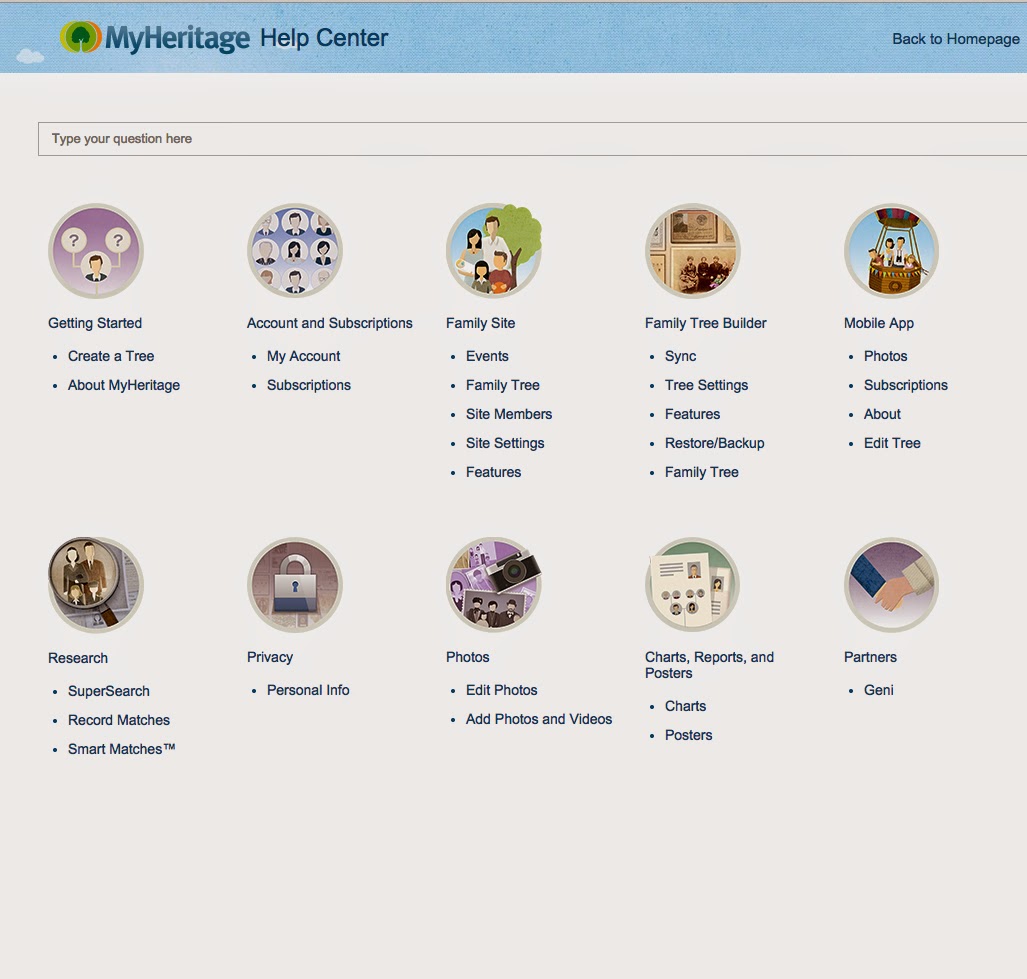
MyHeritage.com is probably the program I get the most questions about. Apparently, the users fail to look at the links on the bottom of the startup page. Here is a screenshot of the bottom of the page with an arrow pointing to the links to Support, Help and the Forums.


Here is another screenshot showing the page available from the Support link:


There are three sections: the Help Center, the Forums and many Video Tutorials. The Help Center is extensive and detailed:


The Forums also provide an extensive and rapid response to particular questionsm mainly because of the huge membership base of MyHeritage around the world.


The Video Tutorials are more basic but are supplemented by a large number of videos on YouTube.com.


findmypast.com

I have never been able to figure out why some users of all of these programs, when they have a question, fail to go to the help menus with their extensive resources. Every day I am providing support, I get questions that can be answered rather easily from the help menus. Here in findmypast.com that is also the situation. Here is a screenshot with an arrow showing the link to the Help and advice link.


The link has four choices; Getting started, Expert advice, Top tips and Frequently asked questions. Here are the screenshots for each of these choices:

Getting started:


Expert advice:


Top tips:


And last, Frequently asked questions:


If you realize that these help centers and other resources are always available, you can quickly answer any type of questions. As you can see, the amount of support varies from program to program but there is always more in the help menus than most people realize.

Sunday, November 2, 2014

Comments on Becoming an Excellent Genealogist -- Chapter Ten

This is an ongoing series of chapter by chapter comments on the book,

Meyerink, Kory L., Tristan Tolman, and Linda K. Gulbrandsen. Becoming an Excellent Genealogist: Essays on Professional Research Skills. [Salt Lake City, Utah]: ICAPGen, 2012.

I am now commenting on Chapter Ten: Big City Research by James W. Petty, AG, CG.

The idea that there are different methodologies or as Petty expands that term into research patterns is very appealing. He takes the position that researching in big cities is different than "traditional genealogy methods." I am not sure what this means and I am further not sure what is meant by traditional genealogy methods in this context. After reviewing the entire article, I am puzzled as to why "big cities" is a category different from research anywhere else in the United States? It seems to me that the methodologies outlined by Petty apply to every part of the country. Each part of the country has it own distinctive types of records. To me, the main issue with research methodologies is apply a common analytical process to the records available no matter what the location. I would certainly not characterize the research in rural areas as "relatively simple" when comparing the methodologies to those used in any other part of the United States. Petty seems to make this distinction based on the criteria of the size of the population and the number of records. My experience is that finding a family in a big city is usually easier than tracking a family through rural areas.

From my own experience, very few of the sources outlined in the chapter apply solely to big cities. I would suggest that traditional genealogical research includes research methods that can apply just as well to big cities as they can to rural areas of the country. For example, Petty mentions some records such as port of entry and shipping records that apply only to those cities that are sea ports. The U.S. has huge cities such as Phoenix (mentioned in the article), Atlanta, Chicago and others that never acted as ports of entry. In many instances, the differences between large cities in the U.S., when you consider the types of records available, are greater than the differences between the large Eastern U.
S. cities and those in their surrounding area. Boston is a large city, but the records in Boston are similar to those in other smaller communities in Massachusetts and are, in some cases, dramatically different than those in Phoenix or Los Angeles.

One example of this type of difference is that Arizona is a community property state. The land, marriage and other laws in Arizona are derived from Civil Law sources, primarily because of our Hispanic heritage. The community property states are Louisiana, Arizona, California, Texas. Washington, Idaho, Nevada, New Mexico and Wisconsin. Obviously, Wisconsin is not a community property state because of its Hispanic heritage. However, the law in these nine states concerning property ownership, marriage, divorce, probate and inheritance is substantially different than those same laws in the other 41 states. I view this type of variation much more important than the differences in research due simply to increased population. Now, if you are reading about community property law in the United States for the first time, perhaps you need to realize that the location of your ancestors is important.

One very astute observation made in the chapter is made in the context of outlining the use of City Directories for research. I might note that City Directories are available for many smaller cities and towns throughout the U.S. and are not unique to big cities. Here is the quote from page 99:
For a genealogist, these details in a city [referring to directories] is of immense importance, because every place of social interaction created records, and having the means to graphically identify where a person lived in relation to churches, cemeteries, schools, businesses, hospitals, and other facilities provides tremendous opportunities for successful research. 
I would say exactly the same thing about any other location in the United States. I do not think big cities are different, in this way, from any other place in the country. Every level of research in the U.S. and around the world will benefit from an emphasis on determining the exact location where an ancestral family lived, whether it be an apartment in a city or a farm in the country. The importance of determining location is the same regardless of the number of records or the number of people that live in the area. Big cities do present some unique challenges, primarily due to understanding where the records are located and how to obtain access; the article outlines some of those challenges, but my opinion is that the basic methodology for finding ancestors does not change with the number of people or records. It is always based entirely on finding the location and then identifying the available records.

Saturday, November 1, 2014

First hand look at the Family History Library

This past week, I spent the entire week at the Family History Library in Salt Lake City, Utah. During my time in the Library, I was able to view a few of the more obvious changes and get an idea of what I think might happen in the future with this Library and many others. I first need to say, that a visit to the Family History Library is a fabulous experience for any genealogists. I love to go to the library and spend time doing research.

The most obvious change that I observe is the increased number of computer stations. Many of the areas in the library that formerly were used for microfilm readers for example, have been converted to individual computer carrels. It also seems to me that there are many more volunteers and even some younger full-time missionaries than there used to be. The volunteers are easily identified by the badges they wear and the full-time younger missionaries all wear dark suits with badges. I also noticed that the signage in the Library had been updated with large "FamilySearch" signs with the new logo.

The first floor of the library, used to have a large area of books. The books on the 1st floor (main floor) is now mostly computer carrels. There are two large recording booths for doing oral histories and a play area for children. I did not observe either being used during the week I was there, but I spent most of my time on the 3rd floor where the U.S. books are located. My wife spent her time doing research on the B1 International area.

I have heard several comments about the fact that many of the long-time employed consultants were let go. This is obvious on the floors that have been converted to the new "open seating" layout. The professional consultants used to be available at a walk-up desk. Now, there is a reception desk and some couches. You "make an appointment" with the remaining consultants and are given a restaurant-style beeper or flasher, that tells you when your consultant is available. The consultants are free to go anywhere in the Library with the patrons which is an advantage. But they do not spend much of their downtime out on the floor.

Our experience with the staff of volunteers and missionaries was mixed. I had a problem connecting to the WiFi and sought help from the staff. Two young missionaries came to help, but did not seem to know why the problem was occurring or how to fix it. I finally worked out the problem myself after their suggestions did not work. It turned out that in the morning the link with the WiFi was extremely slow in connecting. All you had to do was wait about five minutes and it would finally connect.

I had spotty reports of help from the staff including both volunteers and missionaries. As I have related in a previous post, the patrons I was helping were given wrong information in two instances and told that resources were not available when they were available. My wife, working on another floor, got very good help in Swedish Research. I had a question about a Norwegian translation and could not find anyone who could help. I finally found the answer myself in the reference books. I might mention that it is normal for me that if I have a question, I usually end up answering my own questions, so that did not surprise me. I had another experience with a patron's question about a reference book and none of the available staff seemed to know where the books were located or how to find the particular books requested. I ended up finding the books for the patron myself.

One thing that quickly becomes obvious when dealing with researchers is that they should do their "homework" before coming to the Library. It is a good idea to be aware exactly what is online and what is not. The main reason for this is that books and microfilms that are digitized and online are not usually available any longer on the shelves. Many of the researchers I talked to, could have found the information they were seeking on their own computers at home. But there were valuable resources in the Library that they did not find because they were unaware of how to find them.

If you look on the Family History Expos website, you will see that Holly Hansen, Arlene Eakle and others are going to conduct a whole series of onsite research retreats at the Family History Library. These retreats give the participants the opportunity to experience the Library first hand. While I was helping with the attendees this past week, I found that Holly Hansen, Arlene Eakle, Sharon Monson and I could answer nearly all the questions that were unanswered by the staff of the Library. There is a distinct advantage to coming to the Library in a formal, organized research visit.

I will have more comments on the future of libraries and especially family history collections in the future.

New Developments in BillionGraves.com

Every once and while, I find a new development in a program that adds significantly to the research process. That is the case with the new BillionGraves.com Plus program. Searching on BillionGraves.com remains essentially free, but the new subscription plan adds some remarkable tools to the BillionGraves.com arsenal. The Plus program appears as a new tab on the startup page of the program. Here is a screenshot:


When you search for a person or a cemetery, you get several new options. For example, if I search for my Grandfather's grave in St. Johns, Arizona, I get the following screen:


Then I click on the results and get the following options and information:


Starting in the upper left-hand corner, I can view this person in FamilySearch.org's Family Tree program, I can go on a virtual walkthrough of the cemetery looking for people buried anywhere in the cemetery, and I can search for additional Tanner burials.

By clicking on the virtual walkthrough, I get the following screen:


There are several really interesting and helpful options. First there is an areal view of the cemetery with an adjustable circle. All of the graves in the program inside of that circle are listed in the box on the lower left. By adjusting the size of the circle, I can include more or less names in the box. If I click on a name, the location of that grave shows up on the map. Here is a screenshot showing that feature:


Here I found my Great-grandmother, Margaret Godfrey Jarvis Overson's burial. If I click on the tag on the map, I can then go directly to the entry for her burial.


Clicking on her name in the label, takes me to her burial page:


This way I can move around the cemetery seeing exactly where everyone in my family is buried. I can also use this function to look for anyone I may not know who is buried in the same cemetery. Of course, this whole process requires that someone has taken photos and that the information has been transcribed. When I get to my Great-grandmother's page, I see that a search for Oversons would show 43 additional people. Here is the screen I get when I do that search:


Clicking on any one of the names takes me to that person's burial page and the process can continue. I am really impressed with this technology. This whole process is enabled because BillionGraves.com records the GPS coordinates of the graves at the time the photos are taken.